IAB Mobile Pull Full Page Ad
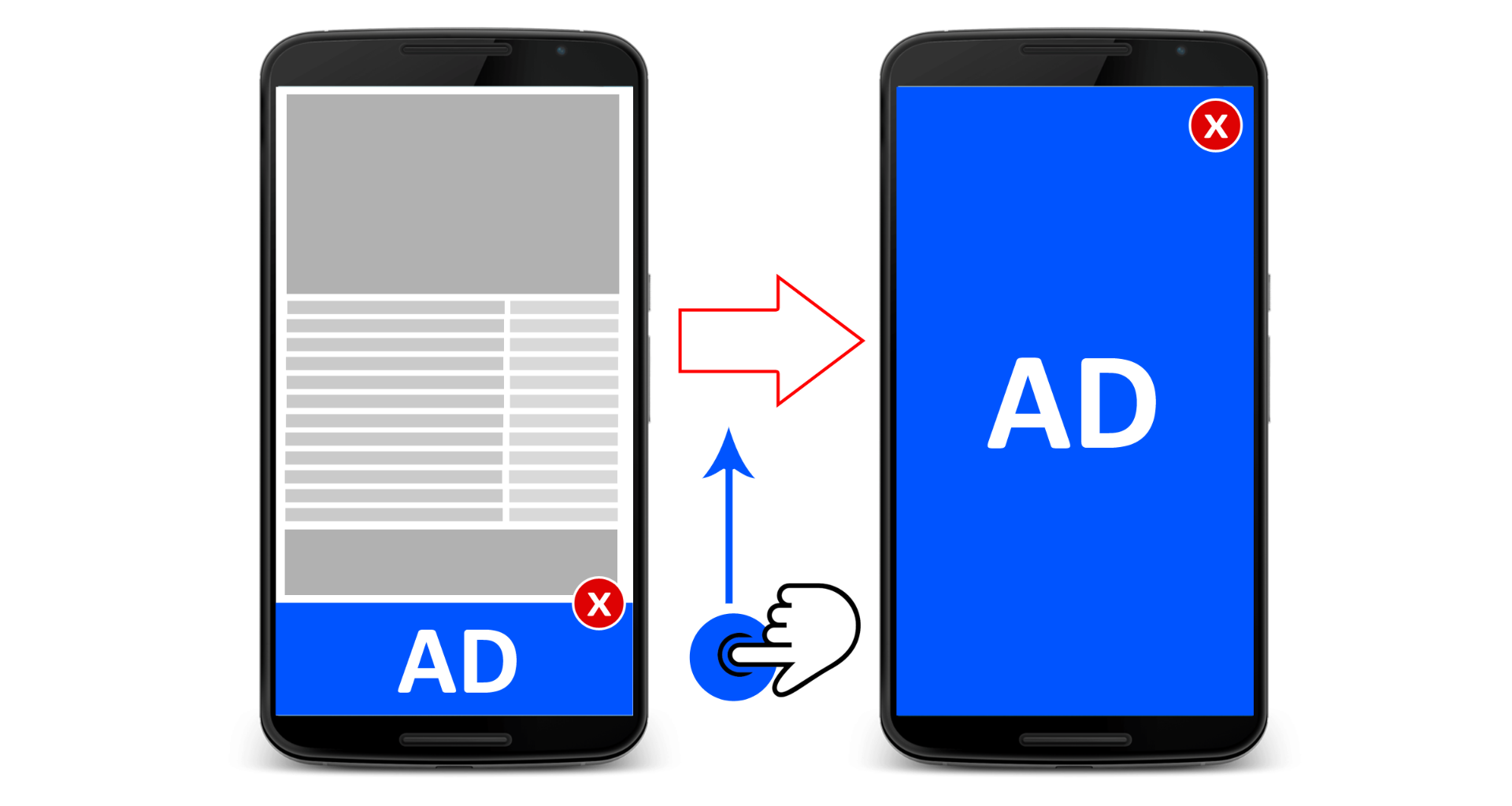
The IAB Mobile Pull Full Page Ad plugin places an ad at the top or bottom of the mobile screen and expands it into a full-page experience on tap. Advertisers on Revive Adserver get a layered, interactive mobile unit.
What it does
- The base ad stays fixed at the top or bottom when the user scrolls or interacts, so it remains visible while the reader uses the site.
- Readers can use the ad and the web content at the same time, which keeps the page usable.
- The advertiser can add a background image, up to four content modules and a navigation tray, so one unit can carry several messages.
- A tap expands the ad vertically from the base ad, and a navigation control loads content inside a module.
- An active close button in the upper right collapses the ad back to the base ad.
How it fits your ad stack
The plugin supports CPM, CPA and CPC pricing models and is described as following IAB guidelines and ad formats, without naming them or the creative file types. Delivery in apps versus mobile web is not stated. MRAID v3.0 is IAB Tech Lab's interface for rich-media ads in mobile apps, so teams planning in-app use should check how the creative talks to the container.
Full feature details
The ‘IAB mobile pull full page ad plugin’ for Revive Adserver places the ad either at the bottom or at the top of the mobile device screen. The position of the ad on the display remains constant when the end user scrolls or interacts with the website.
The plugin allows the user to interact simultaneously with the ads and the web content. The advertiser can add background image, ad content module and navigation tray. If the user clicks on the ad, the background image and the other modules will enter as an expansion vertically from the Base ad. When the user clicks the navigation control, it loads the content within the content module.
The advertiser can add maximum of four content modules and a navigation tray in the ad. An active close button is enabled in the upper right corner, Tapping the close button will collapse the full page Ad Component, ideally in the vertical manner of its expansion, and display the base ad.
Benefits
- The plugin supports CPM, CPA, and CPC pricing models.
- This ad follows IAB guidelines and ad formats.
Frequently Asked Questions
Included with every plugin
- Installation and setup help. We help you install the plugin on your Revive Adserver and confirm that it is working.
- 3 weeks of free support from the day of delivery, covering installation, configuration and any bug in the plugin.
- Your Revive Adserver version. Choose your version in the Product Versions drop-down on this page.
- Licenses to fit your setup. Choose Single Domain, Multi Domain or Source Code in the License drop-down.
Need changes made for your setup? Custom work and consulting are available. Contact us with your requirements.
Common questions
Which Revive Adserver versions does this plugin support?
The supported versions are listed in the Product Versions drop-down on this page. If you run a version that is not listed, contact us before ordering.
What does the free support cover?
For 3 weeks from delivery we help with installation, configuration and any bug in the plugin. Custom development and problems caused by other plugins or your hosting are not part of the free support, but we can quote them separately.
Can you adapt the plugin to my setup?
Yes. Custom work is available. Tell us what you need and we will quote it.