Mobile SDK Viewability Plugin
The Mobile SDK Viewability plugin counts an in-app impression only after the creative has been in view for a set share and time. App publishers and advertisers running the Revive Adserver mobile SDK get counts that reflect ads that could be seen.
What it does
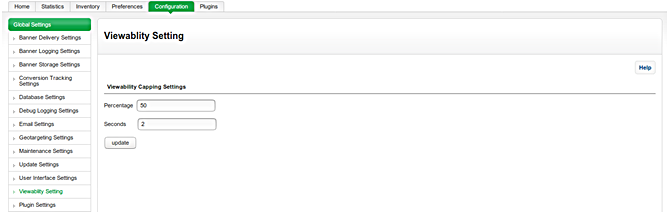
- Admin options set the viewability percentage and view time, with a default example of more than 30% for 3 seconds.
- An in-app impression counts only after those thresholds are met, not when it merely loaded.
- Ad wastage becomes visible, such as a creative sitting below the visible part of an app screen.
- Banner, HTML banner and text ads in mobile apps are covered.
- Reports let marketers judge inventory value.
How it fits your ad stack
It measures ads delivered through the Revive Adserver mobile SDK, so it is an add-on for apps that already use that SDK. The Open Measurement SDK lets third-party verification vendors measure viewability and verify ads in apps, and the MRC display standard counts an ad as viewable at 50% of pixels in view for 1 continuous second. MRC accreditation applies to measurement vendors, so a plugin can offer configurable measurement but cannot claim accreditation.
Full feature details
Any creatives delivered must be seen by a real user for the campaigns to have an impact, change the perception and enhance brand loyalty. Mobile SDK Viewability plugin for Revive Adserver allows advertisers to know the impression count in every campaign in digital advertising targeting mobile users.
An impression is nothing but the view gained by a creative, when the user views a creative displayed on a mobile the impression count will increase for that particular creative.This plugins help advertisers to understand campaign effectiveness and reduce ad wastage to a great extent thereby leading advertising spend to be allocated to the most valuable media. With this plugin, marketers can understand the real brand value based on impressions delivered through each campaign.
What this plugin do?
• The plugin provides advertisers with precise metric reports detailing the number of times the creatives have appeared before the real user.
• At present impressions are calculated when the creative gets loaded on the mobile, meaning the creative may or may not be viewed by the user but still it will be counted as an impression.
• The plugin provides marketers with an opportunity to know the exact impression count (i.e.) impressions viewed by real users.
• The plugin ensures that impression count is added only when the creative is viewed by a real user and assists marketers in finding the exact impression count of every particular creative.
• This leads to increased impression count but in reality, advertiser doesn’t have any sure method to know if the impression is really viewed by a real user, thereby increasing ad wastage and revenue loss.
• The plugin ensures that impression count is added only when the creative is viewed by a real user and assists advertiser in finding the exact impression count of every particular creative.
• Viewability metric in digital advertising tracks ad impressions seen by a real user. The plugin makes sure that the impression of a creative will not be counted unless it is viewed by a real user.
• The plugin provides the admin options to define viewability percentage and time of banner to calculate the impression when a user views the creative.
• For example, A valid impression is calculated by the plugin whenever more than 30% (viewability percentage) of the ad is viewed by the user for 3 seconds (banner view time) of default time.
An ideal example of a faulty impression count is a creative placed on the bottom of the app screen. The user visits the screen but doesn’t scroll till the bottom of the app page to see the creative, without the plugin impression count will be added to the creative but with Viewability Ad plugin the fake count is restricted. Simply put, Viewability Ad Plugin measures whether the creative delivered is provided a chance to be seen by a real user.
The plugin provides marketers with precise metric reports detailing the number of times the creatives have appeared before the real user. Creatives delivered must be seen by a real user for the campaigns to have an impact, change the perception and enhance brand loyalty. The plugins help marketers to understand campaign effectiveness and reduce ad wastage to a great extent thereby leading advertising spend to be allocated to the most valuable media. With this plugin, marketers can understand the real brand value based on impressions delivered through each campaign.
Supported Ad Formats
• Banner
• HTML Banners
• Text ads
Benefits of the plugin
• Reduce Ad wastage and improve ROI.
• Access to data about creative on the user screen.
• Optimized ad placement based on usability measurement.
• Know the value of inventory.
• Improve transparency in campaign performance.
• Amplify the quality of campaigns.
Frequently Asked Questions
Included with every plugin
- Installation and setup help. We help you install the plugin on your Revive Adserver and confirm that it is working.
- 3 weeks of free support from the day of delivery, covering installation, configuration and any bug in the plugin.
- Your Revive Adserver version. Choose your version in the Product Versions drop-down on this page.
- Licenses to fit your setup. Choose Single Domain, Multi Domain or Source Code in the License drop-down.
Need changes made for your setup? Custom work and consulting are available. Contact us with your requirements.
Common questions
Which Revive Adserver versions does this plugin support?
The supported versions are listed in the Product Versions drop-down on this page. If you run a version that is not listed, contact us before ordering.
What does the free support cover?
For 3 weeks from delivery we help with installation, configuration and any bug in the plugin. Custom development and problems caused by other plugins or your hosting are not part of the free support, but we can quote them separately.
Can you adapt the plugin to my setup?
Yes. Custom work is available. Tell us what you need and we will quote it.