Tracking and Reporting for Delivery Limitation
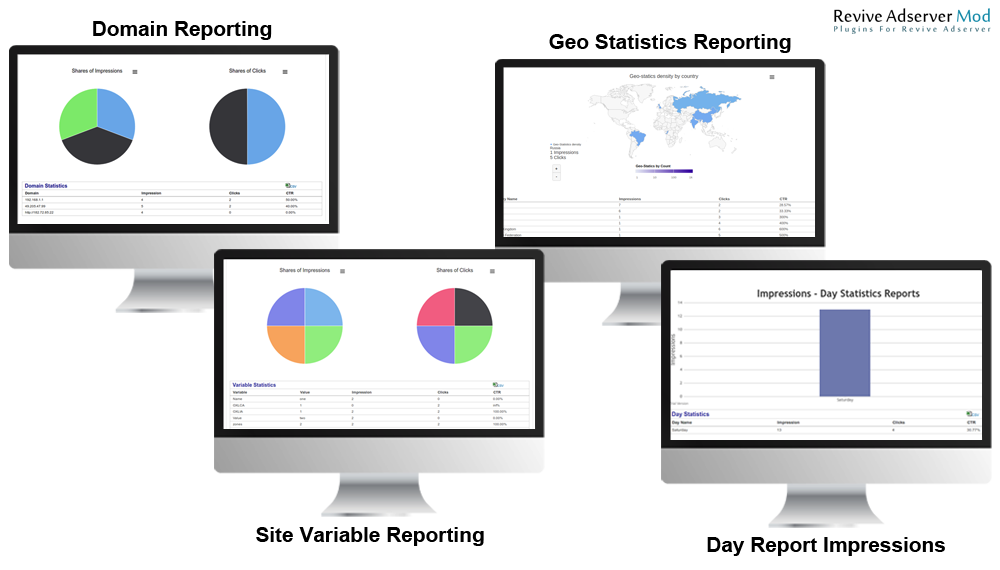
This plugin tracks and reports geo, client, site and time information for Revive Adserver delivery options, shown as maps and charts. Ad ops teams use it for analysis beyond the standard Revive statistics.
What it does
- Delivery can be viewed by country, region, city, browser, operating system, referring page and day of week, so you see where and when delivery actually happens.
- Geo fields include country code, region, city, postal code, latitude, longitude, ISP, DMA and area code, and are shown on a Google map.
- Client fields (user agent, browser, operating system, domain, IP address, languages) are shown in pie charts, page URLs in line charts and day of week in bar charts.
- Every report exports to CSV for sharing and further analysis.
How it fits your ad stack
It extends the client, site, geo and time breakdowns that Revive already has for delivery options. The tracked fields include IP address and precise location, which privacy laws such as GDPR and CCPA/CPRA may treat as personal data, so decide what you store and for how long before enabling it.
Full feature details
Do you want an advanced analytical report for Revive based on on delivery limitations? This plugin used to achieve all possible analytical report for revive delivery options. Revive had delivery options with following breakdowns such as client, site, geo and time delivery options.
Analytical - Tracking
- Analytical module used to track following user information’s
- User Geo information such as country code, region, city, postal code, latitude, longitude,ISP, DMA and area code.
- User client information such as user agent, browser, operating system,domain,ip address and languages
- User site information such as page url , referring page, source value and variable
- Time information such as day of week
Analytical - Reporting
- Analytical module used to report following user information’s
- User geo information such as country code, region, city, postal code, latitude, longitude,ISP, DMA and area code in Google map.
- User client information such as user agent, browser, operating system, domain, ip address and languages in pie chart.
- User site information such as page url and referring page in line chart and source value and variable in pie chart.
- Time information such as day of week in bar chart.
Export to CSV
- All reporting can export as csv.
Frequently Asked Questions
Included with every plugin
- Installation and setup help. We help you install the plugin on your Revive Adserver and confirm that it is working.
- 3 weeks of free support from the day of delivery, covering installation, configuration and any bug in the plugin.
- Your Revive Adserver version. Choose your version in the Product Versions drop-down on this page.
- Licenses to fit your setup. Choose Single Domain, Multi Domain or Source Code in the License drop-down.
Need changes made for your setup? Custom work and consulting are available. Contact us with your requirements.
Common questions
Which Revive Adserver versions does this plugin support?
The supported versions are listed in the Product Versions drop-down on this page. If you run a version that is not listed, contact us before ordering.
What does the free support cover?
For 3 weeks from delivery we help with installation, configuration and any bug in the plugin. Custom development and problems caused by other plugins or your hosting are not part of the free support, but we can quote them separately.
Can you adapt the plugin to my setup?
Yes. Custom work is available. Tell us what you need and we will quote it.